How Critical Alerts Work in FleetSnap (Emergency vs Critical Guest Messages)
What makes a Turo guest message Emergency or Critical, which ones text you around the clock, why an alert might not have reached you, and what to do when one arrives. For Fleetsnap Pro and Concierge.
 By The FleetSnap Team·6 min read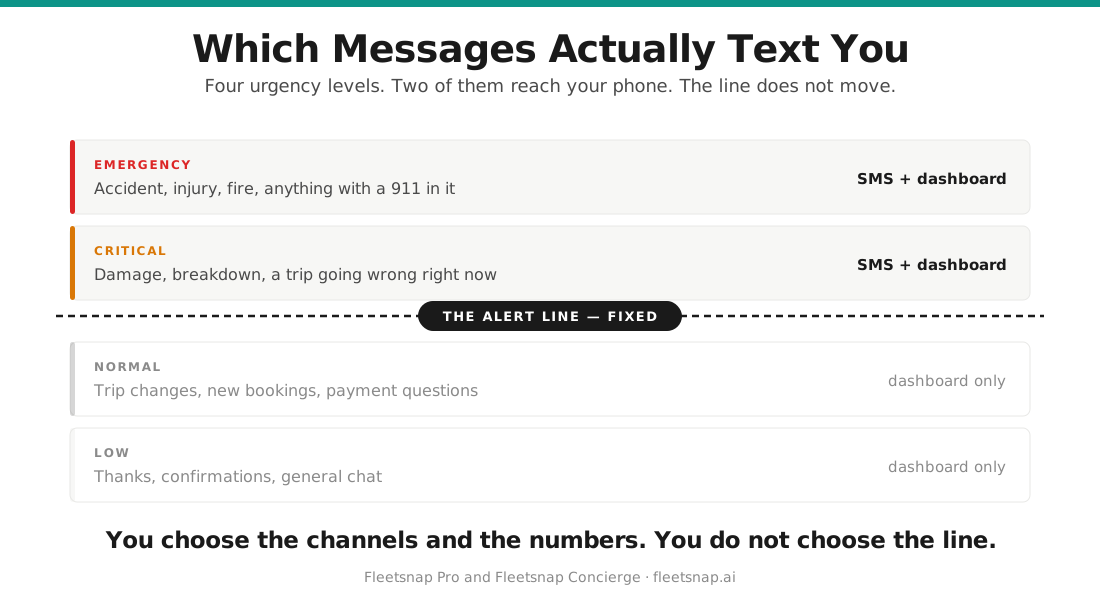
In this guide
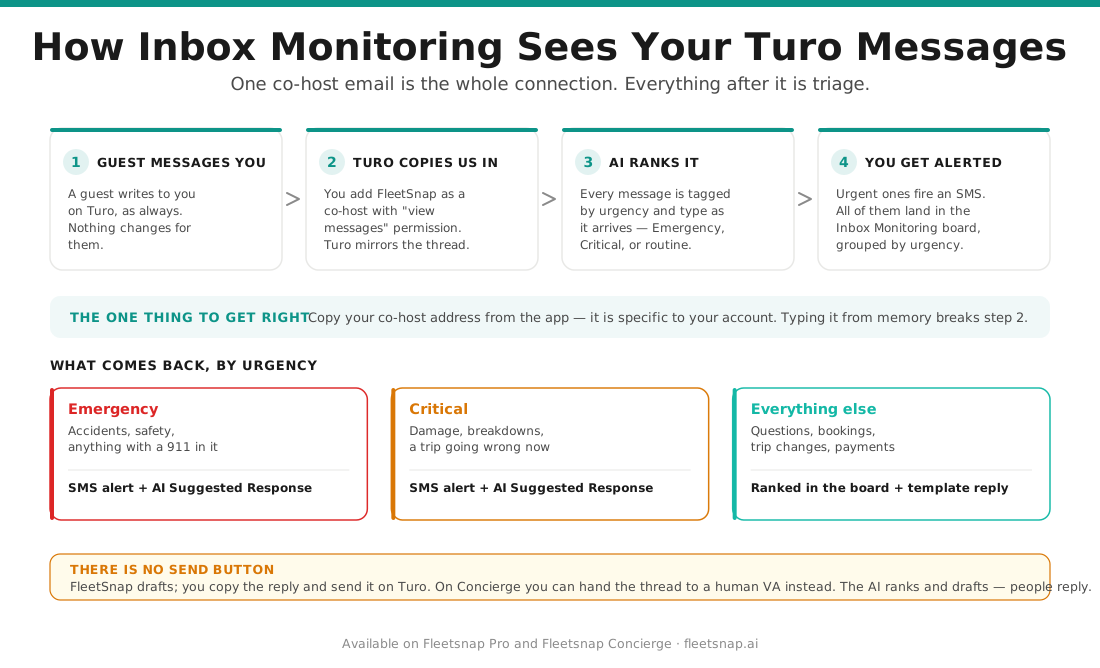
Every guest message that reaches your FleetSnap co-host address is read and given an urgency level. Only two of those levels alert you. The cut-off is fixed: there is no setting that changes which levels send a text. The controls you do have are which channels are on and which phone numbers we use.
| Level | Badge | Does it alert you? |
|---|---|---|
| Emergency | Red | Yes - a text, straight away |
| Critical | Orange | Yes - a text, straight away |
| Normal | Grey | No - it waits in Inbox Monitoring |
| Low | None | No - routine notices and marketing |
What counts as an Emergency
Emergency is reserved for an active safety risk:
- An accident with injuries
- A guest safety emergency, such as being stranded somewhere dangerous, or a medical emergency
- A stolen or missing vehicle
- Severe damage during an active trip with a safety concern
- Smoke, fire, or a burning smell from the vehicle
- The vehicle making dangerous sounds or behaving unsafely
- A check engine light during an active trip
When the message reads as an active safety risk, the drafted reply is written safety-first: it tells the guest to pull over somewhere safe and call 911 before anything else is discussed.
What counts as Critical
Critical is urgent but not dangerous - something that needs an answer within hours rather than days:
- A guest locked out of the vehicle right now (not a guest asking how lockouts work)
- A new booking that starts within 36 hours, which needs immediate preparation
- A trip extension request during an active trip
- A car that will not start, or a breakdown, right now on an active trip
- Damage reported during an active trip where the guest is asking you to act
- A payment problem affecting an active trip, as opposed to a routine invoice
- A guest reporting an urgent problem and asking for help, such as lost keys mid-trip
What does not alert you
These are ranked Normal or Low. They still appear in Inbox Monitoring, and on Concierge your VA still works them - they just do not text you:
- Booking confirmations more than 36 hours ahead, trip started and trip ended notices, and photo upload confirmations
- Payments that went through, routine reimbursement invoices, and scheduled payment reminders that are not past due
- Every cancellation, whoever cancelled it and however close to the trip it lands
- Automatic trip change notifications and Turo system notices
- Casual guest messages, and guests telling you something rather than asking for help ("I parked it on Main Street")
- Clarifying questions, and guests who sound confused or defensive
- Acknowledgements and sign-offs - "Thanks!", "Got it", "Sounds good", "All set", "Nevermind"
- Photos with no text describing a problem. A photo on its own is not read as damage; guests send photos to show where they parked or how full the tank is
- Ratings, review reminders, newsletters, and promotional email
When a message is genuinely ambiguous, FleetSnap ranks it Normal rather than Critical. A false alarm costs you more trust than a message that waits.
How an alert reaches you
An Emergency or Critical message sends a text straight away, around the clock. There is no quiet-hours window on this path.
The text carries:
- The level and the message type on the first line, for example
EMERGENCY - DAMAGE REPORT - The vehicle
- The guest's name, and their phone number when Turo supplied one
- The first 200 characters of what the guest wrote
- A reply link that opens the thread on Turo
- A view link that opens the alert inside FleetSnap
Texts go to every number saved in your notification settings - the "Primary Phone Number" and the optional second number. "Text Message (SMS)" is on by default. WhatsApp is available as an extra channel and stays off unless you switch it on.
Why an alert might not have reached you
Working down from the most common cause:
- The message was ranked Normal or Low. Open the thread in Inbox Monitoring - the badge tells you how it was ranked.
- You marked that thread handled less than two hours ago. Marking a thread handled mutes new alerts on it for two hours, so an issue you already dealt with does not text you again about itself. After two hours, a new Emergency or Critical message on the same thread alerts you normally.
- The thread is snoozed. A snoozed thread does not alert until its snooze runs out.
- Inbox monitoring is switched off, or both text and WhatsApp are off.
- No phone number is saved. Without one there is nowhere to send the alert.
- The subscription is not active, or a trial has expired. Alerts stop with the plan.
- The vehicle is not one of yours in FleetSnap. If the message names a vehicle that does not match any vehicle on your account, the text is held back - this is what stops a co-hosted car you do not pay for from paging you. The thread is still created and still visible in Inbox Monitoring; only the text is filtered. If a car of yours is missing, add it to your fleet.
If none of these fit, the thread will still be in Inbox Monitoring. Open it and check the badge and the timestamp.
What to do when an alert arrives
- Open the view link in the text, or open "Inbox Monitoring" and pick the thread.
- Read the guest's message in full - the text only carries the first 200 characters.
- Use the "Suggested Response" on the thread. Emergency and Critical threads get an AI-written draft; other threads get a template.
- Click "Regenerate" for a different draft, or "Edit" (then "Done") to change the wording yourself.
- Click "Copy", then "Reply on Turo" to send it. FleetSnap drafts the reply; you send it on Turo.
- On Concierge you can use "Assign to VA" instead and let your VA take the thread.
- Click "Mark as Handled" once the issue is dealt with.
What Pro and Concierge each get
Both plans rank every message and send the same Emergency and Critical texts, with the same AI-written "Suggested Response" on urgent threads.
Concierge adds the human side: a trained VA works your inbox alongside the alerts and can be assigned a thread, and the plan's published response targets are under 3 minutes on urgent issues and under 15 minutes on everything else. A VA has to be assigned to your account for that half to be active.
The free plan does not include inbox monitoring, so it does not receive these alerts.
Questions hosts ask
What is the difference between an Emergency and a Critical alert?
Emergency means an active safety risk - an accident with injuries, a guest stranded somewhere dangerous, a stolen car, smoke or fire, or a check engine, brake, oil, or temperature light during an active trip. Critical means urgent but not dangerous - a guest locked out right now, a booking starting within 36 hours, a breakdown or damage on an active trip, a trip extension request, or a payment problem on an active trip. Both send you a text straight away; the difference is how the drafted reply is written, with Emergency putting safety instructions first.
What makes a message Critical?
A message is ranked Critical when it is urgent but not dangerous and needs an answer within hours: a guest locked out of the car right now, a new booking that starts within 36 hours, a trip extension request during an active trip, a breakdown or a car that will not start on an active trip, damage reported mid-trip where the guest wants you to act, a payment problem affecting an active trip, or a guest asking for help with an urgent problem such as lost keys. A battery light, or any other dashboard warning light, is Critical at minimum.
What counts as an emergency message?
A message counts as an Emergency when there is an active safety risk: an accident with injuries, a guest stranded somewhere dangerous or in a medical emergency, a stolen or missing vehicle, severe damage on an active trip with a safety concern, smoke, fire, or a burning smell, the car making dangerous sounds, or a check engine, brake, oil pressure, or temperature light during an active trip. Emergency messages text you immediately and their drafted reply leads with safety instructions.
Which messages actually text me?
Only Emergency and Critical. Normal and Low messages appear in Inbox Monitoring and, on Concierge, are worked by your VA, but they never send a text. That cut-off is fixed and cannot be changed from settings.
Why didn't I get a text for that message?
The usual reasons, in order: the message was ranked Normal or Low; you marked that thread handled within the last two hours; the thread is snoozed; inbox monitoring or both notification channels are switched off; no phone number is saved; the subscription is inactive or a trial expired; or the vehicle named in the message is not one of the vehicles on your FleetSnap account. Open the thread in Inbox Monitoring and check its badge first - that rules out the most common cause.
Do critical alerts come through at night?
Yes. Emergency and Critical messages send a text as soon as they are classified, around the clock. There is no quiet-hours window on this path.
Can I change what counts as critical?
No. The Emergency and Critical definitions are fixed, and there is no urgency threshold setting. What you can change is which channels are on - text is on by default, WhatsApp is off unless you switch it on - and which phone numbers alerts go to.
Do cancellations trigger an alert?
No. Every cancellation is ranked Normal, whether the guest or Turo cancelled it and however close to the trip it lands. Cancellations appear in Inbox Monitoring but they never send a text.
Why did alerts stop on a thread I already dealt with?
Marking a thread "Mark as Handled" mutes new alerts on it for two hours, so an issue you have already resolved does not keep texting you. Once two hours have passed, a new Emergency or Critical message on that same thread alerts you normally again. Snoozing a thread mutes it until the snooze runs out.
Will I be alerted about a car that isn't on my FleetSnap account?
No. If the message names a vehicle that does not match any vehicle on your account, the text is held back, which is what stops a co-hosted car you do not pay for from paging you. The thread is still created and still visible in Inbox Monitoring. If a car of yours is missing, add it to your fleet so its messages can alert you.
Does FleetSnap send the reply to the guest for me?
Not on Fleetsnap Pro. FleetSnap drafts a "Suggested Response" that you copy and send on Turo with "Reply on Turo". On Fleetsnap Concierge you can use "Assign to VA" and a trained VA handles the reply for you.
What is the difference between the alerts and the bell in the header?
They are two separate feeds. The bell carries fleet issues such as a damage claim needing attention or a vehicle flagged as off market, ranked high, medium, or low. Guest-message alerts are ranked Emergency, Critical, Normal, or Low, reach you as a text, and live in Inbox Monitoring.