Car Rental Management Software: Running the Fleet After the Booking
Booking software ends at the reservation. Management software covers what comes after: guests, damage, maintenance and per-car profit.
 By The FleetSnap Team·5 min read
In this guide
"Management" is doing a lot of work in that phrase, and most products using it mean booking management.
Taking a reservation is the easy part and it has been solved for twenty years. The hard part is the three days the car is gone and the hour after it comes back, and that is where the hours and the money go.
Booking software vs management software
A booking engine takes a reservation, holds availability, and processes payment. Necessary, commoditized, and finished the moment the trip starts.
Management software covers the trip and everything around it. Who is talking to the guest, what they are saying, what the car needs, what came back damaged, and whether this vehicle is actually making money.
The split matters because the second category barely existed five years ago, so operators who bought early have a booking tool and a set of problems it was never built to touch. The booking tool is not failing. It is doing its job and stopping. Car rental software sorts the whole market into its four categories.
Where the operating hours actually go
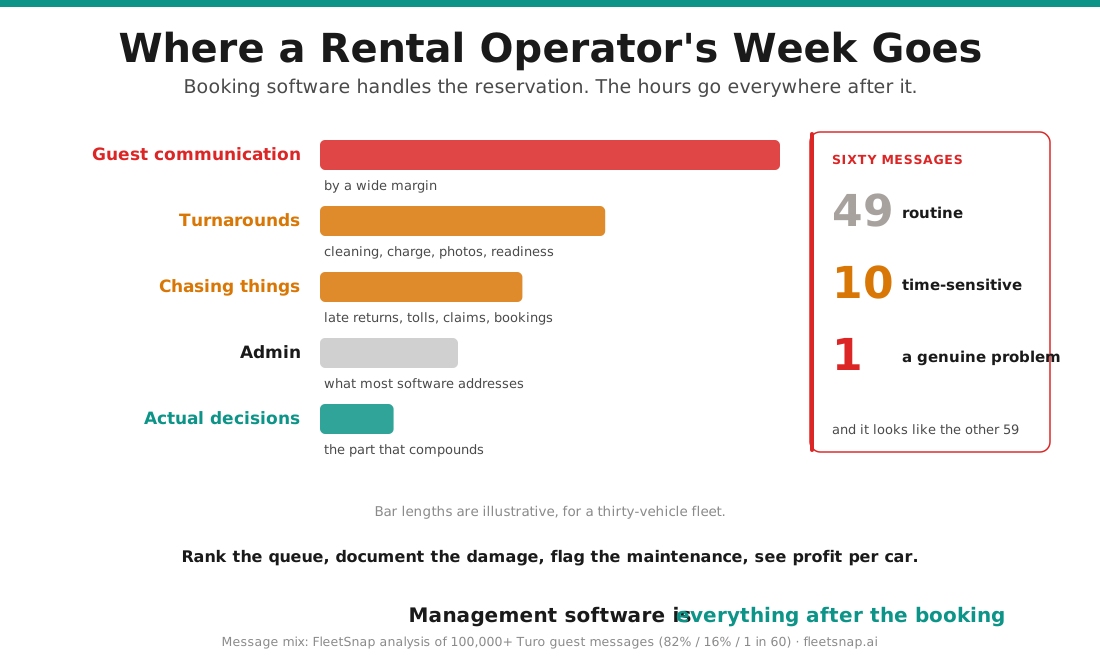
If you tracked a week of running a thirty-vehicle fleet, the time would break down roughly like this.
Guest communication, by a wide margin. Dozens of messages a day across platforms, most of them routine, a few of them urgent, with no way to tell which is which without reading all of them.
Turnarounds. Cleaning, fuel or charge, photos, readiness checks, coordinating whoever is doing it.
Chasing things. Late returns, unpaid tolls, damage claims, maintenance bookings, the three conversations you started and did not finish.
Admin. Reconciling payouts across channels, logging costs, working out what the month actually did.
Actual decisions. Pricing, which car to buy, which to sell. The part that compounds, and the part that gets squeezed into whatever is left.
Most software addresses the fourth category. The first three are where the week goes.
Guest messaging and why it eats the day
The volume is not the problem. The ranking is.
Sixty messages arrive. Forty-nine are routine, about pickup time, about whether the car has a charger. Ten are time-sensitive and need a real answer. One is a guest mentioning that the brakes feel soft.
That one is worth more than the other fifty-nine combined and it arrives looking exactly like them. There is no notification setting that distinguishes it, which is why most operators eventually turn notifications off and then read everything in a batch, which is how the brake message gets missed. That mix, roughly 82% routine, 16% time-sensitive and about 1 in 60 a genuine problem, is what our analysis of 100,000+ Turo guest messages found.
This is the specific thing FleetSnap's AI does. It reads every incoming message and ranks it by urgency, so the brake message surfaces at the top rather than in chronological order. Your team still writes every reply. Nothing goes out unattended. The ranking is the product.
Damage and maintenance as recurring costs
Both get treated as events. They are better understood as rates.
Damage has a recovery rate, and yours is probably lower than you think, mostly because of claims never filed rather than claims refused. At thirty vehicles, a few hundred dollars a month written off quietly is a real number by year end. The fix is documentation that exists without effort and a list of open claims that someone looks at. The vehicle damage inspection app guide covers what that documentation needs.
Maintenance has a catch rate: how often a problem is found while it is still cheap. The signal usually arrives first in a guest message, a noise or a warning light mentioned in passing, weeks before the repair. FleetSnap's maintenance agent flags those mentions and logs them against the vehicle. It does not book the repair, but the warning reaches you.
Driving the first rate up and the cost of the second down is less exciting than raising your daily rate and usually worth more.
Reporting that tells you which cars to sell
The report you need is short: profit per vehicle, after everything.
Platform fees at your earnings plan. Cleaning and turnaround. Maintenance amortized across the year. Insurance. Finance if the car is financed. Unrecovered damage. And depreciation, which is typically the largest single cost and appears on no platform dashboard.
Run that and the fleet usually sorts into three groups. A few carrying the rest, a middle that roughly breaks even, and one or two quietly losing money every month while looking busy. FleetSnap's free earnings tool produces that report from your trip export, three reports a month at any fleet size.
Running it with a VA team
Past about twenty vehicles most operators get help, and the software question changes shape.
What matters then is that each person sees their part of the job and not the rest. In FleetSnap, a VA works the guest inbox and submits expenses and receipts through a link, without access to the earnings and P&L, which stay with the owner, and a field person works today's handovers from the operator portal. Whatever you use, ask exactly what each person can see. Shared state, so work does not live in one person's head or a WhatsApp group. And a queue that is ranked rather than chronological, because the whole value of help is that someone handles the routine while the urgent still reaches you.
A VA working from an unranked inbox is just someone else reading sixty messages in arrival order. The Turo virtual assistant guide covers the hiring side.
What to migrate first
If you are adding a management layer to an existing setup, sequence it.
Start with guest messaging, because it is the biggest time cost and the fastest relief. Then damage documentation, because the benefit compounds from the first trip. Then profit reporting, which needs a month of data to be interesting. Then turnaround coordination, which is the most disruptive to change and should go last.
Trying all four at once is how adoption fails.
Questions hosts ask
What is car rental management software?
Software for running the fleet rather than taking the booking. Guest communication, maintenance, damage, turnarounds and per-vehicle profitability.
Is it different from booking software?
Yes. Booking software handles the reservation and stops. Management software covers the trip and everything after it. Most operators need both.
Do I need it if I only rent on Turo?
Turo handles bookings, so you do not need a booking engine. The operations side is the same problem regardless of channel and arrives at the same fleet size.
What should it do that my booking tool does not?
Rank guest messages by urgency, flag maintenance before it becomes a repair, document damage so claims pay, and show profit per vehicle after depreciation.
How do I know when I need it?
When you start missing things you used to catch, or when you add your first team member. Both tend to happen between twenty and thirty vehicles.